


Multiple ChatGPT users are reporting a sudden “You’ve reached our limit of file uploads” error message even though they uploaded only a handful of files. The issue appears to affect both free and ChatGPT Plus accounts, raising questions about whether the platform is experiencing a temporary backend issue or quota miscalculation.
The reports emerged in community discussions where users described hitting the upload limit despite minimal activity. Several users stated they had uploaded only a few files — or none at all — before encountering the restriction.
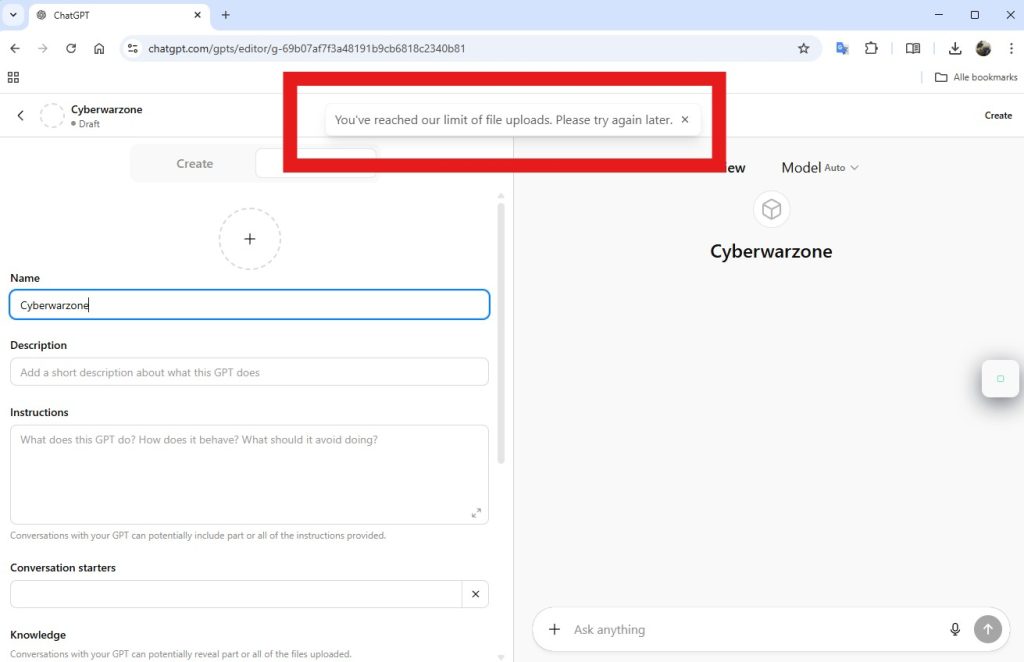
Because ChatGPT normally allows significantly more uploads, especially for paid tiers, the error message suggests a possible system bug or service disruption affecting file processing infrastructure.
What the Actual ChatGPT File Upload Limits Are
ChatGPT normally allows users to upload multiple files for analysis, including PDFs, spreadsheets, images, and other documents. However, the number of uploads allowed depends on the subscription tier and system capacity.
For example, free users are typically limited to about three file uploads per day, while ChatGPT Plus users can upload significantly more files within a rolling time window. According to platform documentation, Plus accounts can upload roughly 80 files within a three-hour period before hitting rate limits.
Each file uploaded to ChatGPT also has a size restriction. In most cases, the maximum supported size is around 512MB per file, although certain formats such as spreadsheets and images may have smaller practical limits depending on processing requirements. These limits exist to ensure the platform can reliably process large documents without overwhelming compute resources.
Possible Causes Behind the ChatGPT Upload Limit Error
While OpenAI has not publicly confirmed the cause of the sudden upload limit warning, several factors may explain why users are encountering the message despite minimal activity.
One possible explanation is a temporary rate-limiting issue. Large cloud platforms often enforce rolling quotas to prevent excessive resource consumption. If the internal counter responsible for tracking uploads fails to reset correctly, the system may incorrectly assume that a user has exceeded their allowed quota.
Another possibility is a short-term service disruption affecting file processing infrastructure. Community reports show users experiencing upload failures across different browsers and devices, suggesting the problem may originate on the server side rather than within individual user environments.
In some cases, client-side factors such as corrupted browser sessions, cached authentication tokens, or application bugs could also trigger misleading error messages. However, the number of users reporting the issue simultaneously indicates that a platform-level problem is the more likely explanation.
The unexpected “limit of file uploads” error appearing for ChatGPT users appears inconsistent with the platform’s documented upload limits. Community reports indicate that many users encountered the warning after uploading only a few files or even on their first upload attempt.
While the exact cause remains unclear, the pattern strongly suggests a temporary platform issue rather than an intentional restriction. Backend rate-limit miscalculations, service disruptions, or infrastructure updates could all contribute to the problem.
Until an official explanation or fix is announced, users encountering the error may need to refresh their session, try different browsers, or wait for the system’s quota window to reset. If the issue persists, monitoring platform status updates or contacting support may help determine whether a wider service incident is underway.